Upgrading to the latest NVIDIA RTX PRO card often does less for your business than choosing the right vGPU license for your workload. The license, not just the hardware, determines your real-world performance and density.
Imagine installing the newest NVIDIA RTX PRO card expecting faster renders and smoother remote desktops, only to watch performance barely move once the box is powered on.
That outcome traces back less to the GPU than to the license running underneath it, since NVIDIA vGPU performance depends on both layers working together. A virtual GPU setup shares one physical card across several virtual machines, which is what makes 3D rendering in the Cloud and remote desktop work possible at scale, but the card can only do what the license lets it do.
We think the license question gets skipped more often than the hardware question, probably because a GPU is something you can point to on an invoice while a license tier is easy to treat as an afterthought. The rest of this piece works through why the vGPU license deserves roughly the same scrutiny as the latest hardware upgrade, maybe more.
Why hardware upgrades alone can disappoint
The appeal of the newest NVIDIA RTX PRO card is easy to understand, since new hardware generally promises quicker speeds and sharper graphics. Even so, a fair number of businesses in Chicago install the newest GPU and still find virtual desktop performance barely improves, which is the frustrating part.
That gap usually comes down to the software license sitting on top of the NVIDIA vGPU deployment, because the license controls which features actually get switched on. Where the license is too basic for the workload, advanced capabilities - 3D rendering in the Cloud, better density per server - stay locked away regardless of what the card can technically do.
Picture a business that buys a premium GPU and pairs it with an entry-level vGPU license: the hardware's full power never gets unlocked. Users keep hitting slowdowns, and the IT team ends up spending more hours troubleshooting than delivering any real value.
In practice, the license sets the ceiling on what the hardware can do, and no matter how current the GPU generation is, the wrong license keeps the business from reaching it.
The role of virtual GPU licensing in real-world workloads
Virtual GPU licensing isn't some box to check during procurement - it's the gatekeeper for features, scalability and the experience users actually get. Each license edition, whether NVIDIA GRID Virtual PC, Virtual Apps or Quadro Virtual Data Center Workstation, unlocks a different set of capabilities, so the edition chosen matters as much as the card underneath it.
Picking the right one starts with understanding the actual workload rather than the wish list. Are your users running basic office apps, or do they need 3D rendering in the Cloud? Are you supporting a handful of people, or trying to maximize density across every server?
Get that match wrong, and a few problems tend to show up:
Limited features: some licenses don't support CUDA or advanced graphics, which blocks certain applications outright.
Capped density:lower-tier licenses restrict how many virtual machines can share one GPU, cutting into cost efficiency.
User frustration: once performance lags, users lose trust in IT, and productivity tends to drop with it.
Matching the license to the workload is, as far as we can tell, the only real way to make sure the investment pays off.
How NVIDIA vGPU licensing shapes your virtualization strategy
The way NVIDIA vGPU gets licensed feeds directly into the virtualization approach overall. For businesses running VMware vSphere or a similar hypervisor, the license edition decides which features are even available inside the virtual machines.
A mismatch between hardware and license tends to leave resources underused. A business might have a powerful NVIDIA GPU sitting in the rack, but if the vGPU software is the wrong edition, GPU virtualization for the more demanding workloads simply can't be switched on.
This shows up most in mixed-use environments, where some users need high-end graphics - architects and engineers running design or simulation work are the obvious example - while others only need basic desktop functionality. The right license mix lets resources get allocated by actual need, which avoids both overspending and bottlenecks at once.
In Chicago, where organizations tend to run fairly diverse workloads, lining up the vGPU profile and the license with what each team actually does can make a noticeable difference to both performance and cost.
Matching vGPU profiles and licenses: A practical breakdown
Seeing how vGPU profiles and licenses interact in practice makes the decision easier, so here's a closer look at the steps worth working through.
Assess your workload requirements
Start by listing the main applications and tasks users actually run day to day. Flag which ones need advanced graphics, CUDA support or a larger memory footprint.
Choose the right vGPU profile
Each NVIDIA virtual GPU card supports several vGPU profiles, and each one sets how much GPU memory and compute power a given virtual machine gets. Pick the profile that fits what that group of users genuinely needs, not the one that sounds most impressive.
Select a license edition that fits
Match the chosen vGPU profile with a license edition that actually unlocks the features it needs - 3D rendering in the Cloud, for instance, calls for a higher-tier license than basic office work does.
Test before full deployment
Pilot the setup with a small group before rolling it out further. Watching performance and gathering user feedback during that pilot is the clearest way to confirm the license and profile combination delivers what was expected.
Monitor and adjust
Workloads shift over time, so the license and profile choices are worth revisiting rather than set once and forgotten. Upgrading hardware without reviewing the license sitting on top of it tends to waste resources more often than not.
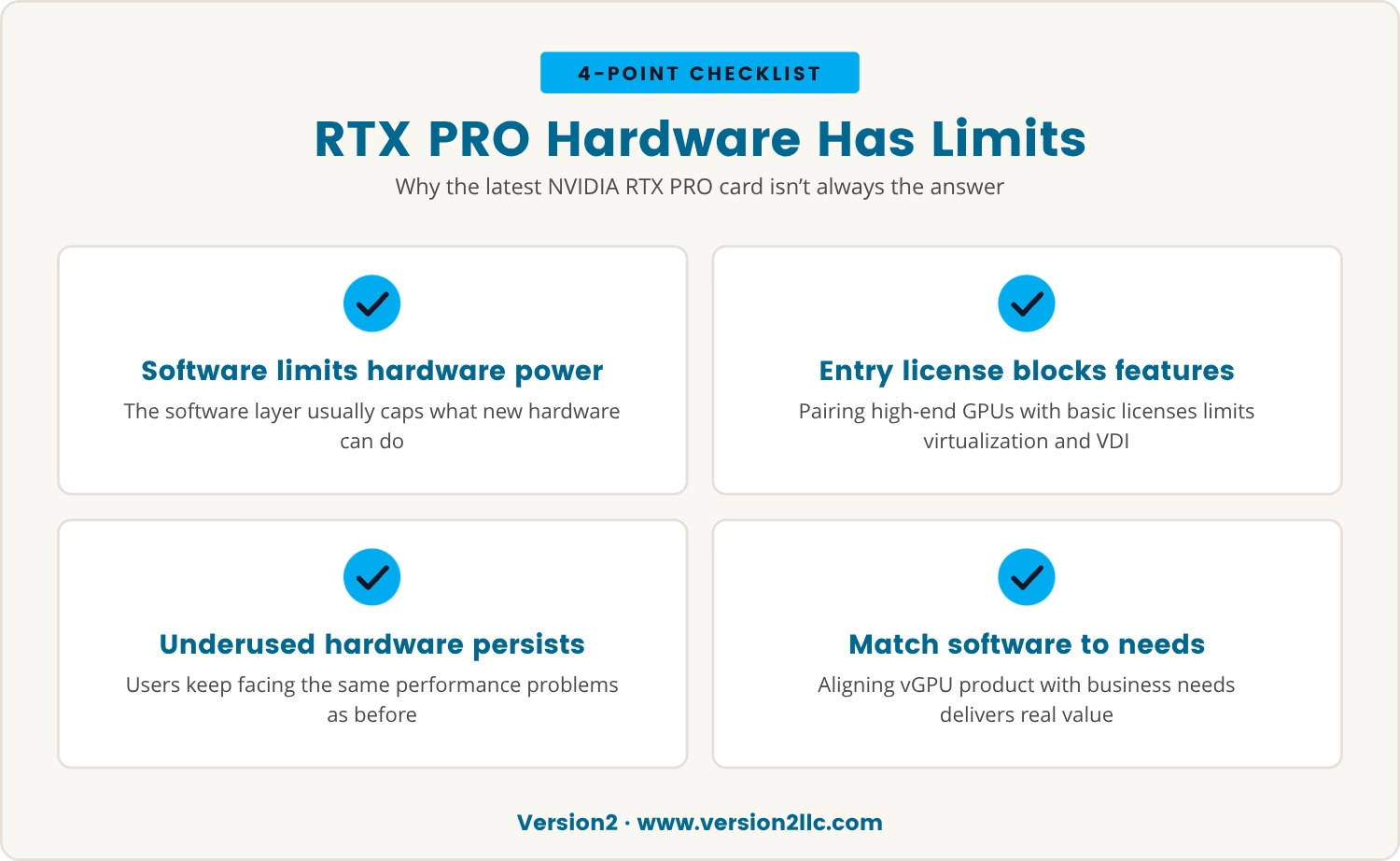
Why the latest NVIDIA RTX PRO card isn’t always the answer
Plenty of IT leaders assume the newest NVIDIA RTX PRO card guarantees better performance on its own, which is understandable given how hardware gets marketed. In reality, the software layer sitting on top is usually what limits what the hardware can actually deliver.
A high-end GPU paired with an entry-level license typically can't support advanced features such as GPU virtualization or larger-scale VDI deployments. The hardware sits there underused, and users keep running into the same performance issues as before.
The better approach is lining up the vGPU software product with what the business actually needs, since that's what turns hardware spending into something that shows up in real-world value.
Common pitfalls when prioritizing hardware over licensing
When hardware upgrades get the attention and licensing gets overlooked, a familiar set of problems tends to follow:
Underutilized investment: expensive GPUs deliver little benefit when the license edition underneath them is too basic.
Feature lockout: capabilities like CUDA acceleration or enhanced graphics stay out of reach.
Poor scalability: the business may not be able to support as many virtual desktops as planned.
Increased support tickets: users report slowdowns or missing features, which adds to the IT team's workload.
Budget strain: money spent on hardware could often have gone further upgrading licenses instead.
Avoiding most of this starts with treating hardware and licensing as one decision rather than two separate ones.
Getting the most from your NVIDIA vGPU investment
Getting real value out of NVIDIA vGPU means treating hardware and licensing as partners rather than a single purchase decision. Worth asking plainly: is the setup running the latest GPU while improvements stay limited? If so, the license edition is probably the bottleneck, not the card.
A considered approach - matching the license to the workload rather than hardware to a wish list - tends to deliver better density, more usable features and a smoother experience for everyone logging in. That's roughly how a technology purchase turns into something that actually moves the business forward.
How Version2 helps you get more from your vGPU setup
Many businesses with 10 to 100 employees find themselves stuck after investing in new GPUs but not seeing the performance or density they expected. At Version2, we understand how frustrating it is to spend on hardware and still run into software limitations.
If you want to see how we approach aligning vGPU licensing with your real workloads—or just want a second opinion on your current setup—reach out to our team for a conversation.
Want confidence in your onboarding investment?
If you’re not happy in the first three months, let us know and we’ll refund your onboarding fee.
What happens if my vGPU license doesn't match my workload?
If the vGPU license is too basic for what's being asked of it, expect limited features, lower performance and fewer virtual desktops per GPU. That mismatch tends to frustrate users and leave the hardware's real capability locked away unused.
Can I upgrade my vGPU software without changing my NVIDIA GPU?
Usually, yes - the vGPU software license can often be upgraded to unlock more features or support heavier workloads without touching the existing NVIDIA GPU. It tends to be a fairly cost-effective way to lift performance.
How does GPU virtualization affect application compatibility?
GPU virtualization lets several virtual machines share one physical GPU, and most modern applications run fine in that setup. Some legacy or highly specialized software, though, may need specific configuration or may not be fully supported.
Is it possible to mix different vGPU profiles on the same server?
Yes - different vGPU profiles can sit on the same server for different virtual machines, as long as the total GPU resources aren't exceeded. That flexibility makes it possible to tailor resources to what each user group actually needs.
What should I consider before deploying vGPU solutions in my environment?
Before deploying, it's worth weighing users' application needs, the features those applications require and the scalability goals behind the project. Getting the hardware and license combination right from the start tends to head off the usual performance and cost issues.
Jeff founded Version2, LLC in 2007 to deliver enterprise-level IT solutions, specializing in virtualization and networking. During his free time he enjoys the outdoors while golfing and snowmobiling.
Learn why IT support for architecture is crucial, how managed IT services protect your firm, and practical steps to keep your projects secure and running smoothly.
Explore IT infrastructure optimization strategies, best practices, and assessment tips to improve performance, reduce costs, and keep your business technology running smoothly.
Explore managed IT services for lawyers, including cybersecurity, compliance, and IT support for attorneys. Learn how these solutions help law firms stay secure and productive.


%20(1).avif)