
October 14, 2026
AI Business Solutions: Is the Fastest Path Really the Best Start?
Chasing visible AI projects first can delay the real gains—margin protection and efficiency—that come from automating your back office before customer-facing tools.


A chatbot’s advanced AI features mean little if former employees can still access customer conversations after leaving. The real risk comes from weak offboarding security, not a lack of automation.
When access controls fall behind who actually still works at a company, the mechanism is what matters: logins don't expire on their own, and offboarding only works if someone actively prunes them. Without that step, customer conversations, sales leads, and account data stay reachable through accounts that should have been closed out already.
Businesses are adopting the AI chatbot for business category at a rapid pace, and according to one survey, 73% of companies use or plan to use AI-powered chatbots for instant messaging. The appeal is straightforward enough: faster replies, smarter automation, support that doesn't clock out.
That appeal tends to pull attention toward the feature list — more integrations, more language options, more automation — as though stacking up options settles the matter on its own. It doesn't, not fully.
The best AI chatbot for business is only as secure as the way you control who can still reach it, and if your offboarding process doesn't keep pace with how people actually leave, you're probably leaving customer data exposed somewhere nobody's checked recently.
We look here at why access controls and offboarding security should shape your chatbot choice, sometimes more than the feature list does.

Comparing chatbots by counting features feels like a reasonable shortcut, and a lot of businesses lean on it. It skips a question that matters just as much: how does the platform handle the people using it?
Every new feature usually opens a new way to access or share data. A chatbot wired into your CRM, email, or messaging apps isn't just automating a task — it's creating another place where sensitive information can be seen or copied.
Focus only on features and you can miss how the chatbot actually manages accounts. Some platforms make adding a user simple but removing one slower than it should be. Others don't sync at all with your employee directory or single sign-on setup.
That gap becomes a real problem the moment someone leaves. If their access isn't pulled right away, they can still view customer conversations or export data — and the more features a chatbot carries, the more places that lingering access can hide.
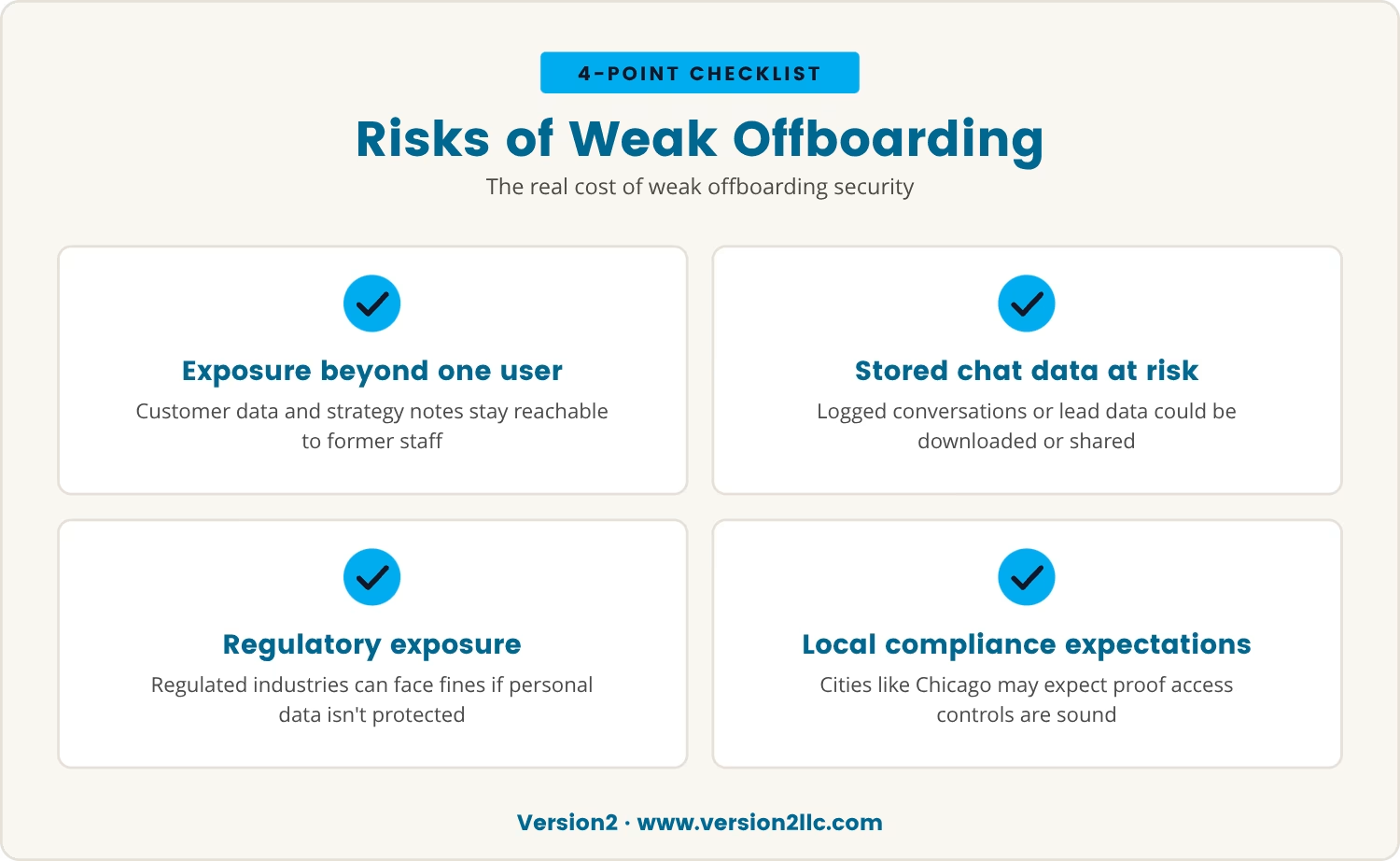
When a former employee's login stays active, the exposure goes beyond one person re-reading old messages. Customer data, sales leads, and sometimes internal strategy notes can sit in the same system, reachable by someone who no longer has any reason to be there.
If your chatbot logs visitor conversations or stores lead information, that data could be downloaded or shared somewhere it shouldn't be. In regulated industries, that can mean fines or legal exposure if personal information wasn't protected the way it needed to be.
Even in smaller companies, a single missed account can cause real trouble. It's not only a matter of trust — it's about keeping the business clear of leaks, whether accidental or not.
This matters especially in cities like Chicago, where plenty of businesses handle sensitive customer data daily, and local rules may expect you to show your access controls are actually sound.
Choosing a chatbot isn't only about what it can do — it's about how it fits your existing workflow for managing users, and that's worth checking closely.
Some platforms let you manage users directly inside the tool. Others connect to systems you already run, like Microsoft 365 or Google Workspace, so accounts get added and removed automatically rather than by hand.
The stronger platforms make it easy to see who has access at any given moment, and they let you remove users with one click or through automated rules — which cuts down the odds that someone who's left can still log in.
If contractors or part-time staff make up a good share of your team, tighter controls matter even more. Look for chatbots that support temporary access or let you set expiration dates on accounts.
AI data security isn't only about encryption or secure servers — it's about making sure the right people, and only the right people, can see and use your data. Offboarding security is a sizable part of that picture.
Some of the most popular AI chatbots for business carry long feature lists, but they don't all treat user access the same way. Here are four gaps worth watching for.
Some platforms require deleting users one at a time, and if that step gets missed, old accounts can stay live for months.
Without a sync to your HR or directory service, you're stuck remembering to remove the same person in more than one place.
Shared accounts make it hard to tell who accessed what, and nearly impossible to cut off just one person's access without disrupting everyone else's.
Some chatbots update access on a set schedule rather than in real time, which means a former employee might still get in hours or even days after leaving.
Each of these gaps can leave customer conversations and data exposed, regardless of how advanced the chatbot's features otherwise are.
It's easy to get pulled into demos and feature comparisons. Before deciding, though, these are the questions worth asking about access and offboarding.
Before we settle on a platform ourselves, we tend to pull quotes from a few other providers and go through the differences ourselves rather than taking the first proposal at face value — that's become something of a habit for us, though we wouldn't claim it's the only sound way to buy.
Once we're reasonably comfortable with a choice, we have legal review the agreement before anyone signs, mainly to catch access and data terms that are easy to skim past. None of that guarantees a risk-free outcome, but it probably improves the odds of catching something before it becomes a problem.
These questions, worked through honestly, help match a chatbot's controls to how your business actually runs.
A small team can usually keep track of who has access to which tool without much effort. As the company grows, though, that gets harder — more employees, more contractors, more integrations, and more places where access can quietly slip through.
If growth is on the horizon, a chatbot that scales with you matters. Look for platforms that automate user management and fit into the workflow you already have; it saves time and lowers risk at the same time.
How many tools does your business run today that need a manual update the moment someone leaves? Each one is a potential soft spot worth a second look.
AI chatbots will likely be more common across businesses by 2026, and as automation and AI agents take on more tasks, how you control access will matter more, not less.
A secure workflow isn't only about blocking threats — it's about letting the business grow without quietly creating new risk along the way. The right chatbot platform helps automate support, qualify leads, and connect to your CRM, while still keeping customer data reasonably protected.
Choosing a chatbot with solid offboarding controls isn't just a technical detail to check off. It's a decision that protects the business, the customers on the other end of it, and the reputation built around both.

Many companies with 10 to 100 employees find it hard to keep up with user access as teams change. At Version2, we understand how easy it is for accounts to slip through the cracks when offboarding isn’t automated.
We invite you to see how our approach to chatbot security fits your workflow. Let’s talk about how you can protect customer data while making automation work for your business.
Try Version2 risk-free: if you’re not satisfied in the first three months, we’ll refund your onboarding fee—no questions asked.
Choose a chatbot platform that connects to your company's main user directory or HR system, so removing someone from the employee list removes their chatbot access with it. Avoid shared logins, and review the user list on a regular basis to catch any account that should've been disabled already.
A former employee with unremoved access can still read customer conversations, download data, or change chatbot settings. That can lead to data leaks, damaged trust, or regulatory trouble, particularly where sensitive information is involved.
No — security features vary a fair amount. Some chatbots for small business automate user management and keep detailed audit logs, while others rely on manual updates. It's worth checking how a platform handles access before deciding.
Yes, many modern chatbot platforms let you automate user management by syncing with HR or IT systems. That's particularly useful for businesses somewhere around 10 to 100 employees, since it cuts manual work and lowers the chance of a missed account.
If WhatsApp is part of the workflow, look for a chatbot that integrates with it directly and supports role-based access controls. That keeps customer messages in the hands of current employees only, and access gets removed quickly once someone leaves.
%20(1).avif)
October 14, 2026
Chasing visible AI projects first can delay the real gains—margin protection and efficiency—that come from automating your back office before customer-facing tools.

September 30, 2026
Explore SOC security services, including what is SOC as a service, to help your business detect, respond to, and stay ahead of cyber threats effectively.

September 25, 2026
Learn why security awareness training for employees is essential, what to include, and how to build a safer workplace with practical, ongoing training programs.
